deviant art

Deviant Login Shop  Join deviantART for FREE Take the Tour
[x]
Shop Similar Prints
This Print Not Available
Download File
ZIP, 3.2 MB
more ▶

More from ~Pasquiindustry

Featured in Groups:

Details

October 22, 2012
3.2 MB
Sta.sh
Link
Thumb

Statistics

Comments: 19
Favourites: 56 [who?]

Views: 12,023 (19 today)
Downloads: 3,885 (4 today)

License

Creative Commons License
Some rights reserved. This work is licensed under a
Creative Commons Attribution-Noncommercial-No Derivative Works 3.0 License.
[x]
:iconpasquiindustry:
Pasqui industry ModernBack changer 2.8
(last update 31/10/2012)

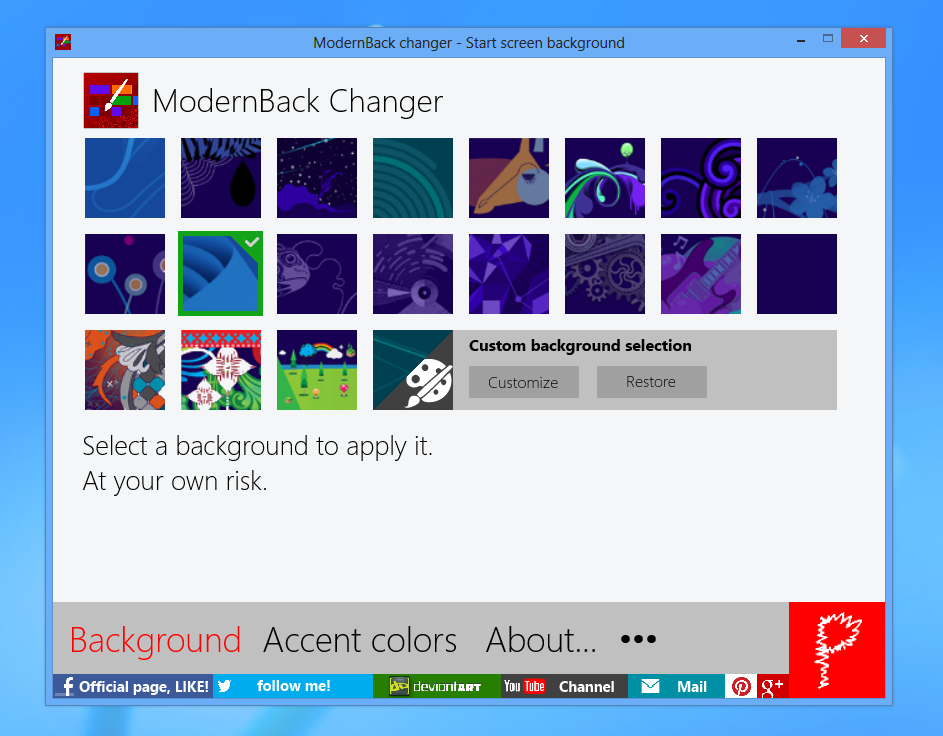
This tool, developed for Windows 8 RTM, allows you to change background and accent color of the immersive start screen in Windows 8.

For the background you can select a custom one by selecting your own image. The wizard will guide you to create the new skin.


Link official article: [link]
Link Youtube tutorial (2.5 version): [link]

For problems, you can contact me by Facebook, twitter, mail, xda or comments ;)

Diffidate from imitations!

Please support me by donating or clicking on adversting on my website. Try my other free products . Thanks! :D
Add a Comment:
 
love 0 0 joy 0 0 wow 1 1 mad 0 0 sad 1 1 fear 0 0 neutral 0 0
:iconlink6155:
~link6155 Jan 4, 2013  Hobbyist Interface Designer
Is this 100% for sure safe to use?
Reply
:iconpasquiindustry:
At this time no, this program edit system files, so never is safe in thsi case, but maybe I will update this tool for safe using without system file editing (but maybe...)
Reply
:icontjbab:
~TJBab Dec 16, 2012  Student Artist
I patched A Background
but nothing comes in the custom background tile so I can't really change the background :/
any solutions?
Reply
:iconpasquiindustry:
I don't know, there are similar problems with other, but there aren't solutions.
In some computers, imageres.dll is inacessible but I don't know how unlock it :(
Try to reboot and restart the procedure (as administrator).
Yopu can try to take ownership of imageres.dll manually
Reply
:icongiveupzn:
I found that we must copy the imageres.dll files to the patch folder, we can get modified file, in which case we must manually replace the imageres.dll files to the System32 folder. This is what we will be able to change a custom background in Charmbar > settings > change pc settings
The editated background is the second one.
Reply
:iconpasquiindustry:
Yes, exactly.
Sometimes it function by my tool, but sometimes no, but I don't know how resolve :(
Reply
:iconthebull1:
It does not seem to work. Nothing happens. It does not add the image I selected to the themes there already. I am on Windows 8 Pro 64bit.
Reply
:iconpasquiindustry:
During the patch appear any error?
Have you tried in mmersive control panel if the theme was pathced?
Reply
:iconthebull1:
No error, said all was good and I can select the background. But the background is nowhere to be selected. Sorry, I don't understand what you mean with: "Have you tried in mmersive control panel if the theme was pathced?"
Reply
:iconpasquiindustry:
I mean in the Windows settings.
Charmbar > settings > change pc settings
The editated background is the second one. ;)
Reply
Add a Comment: